What it is for#
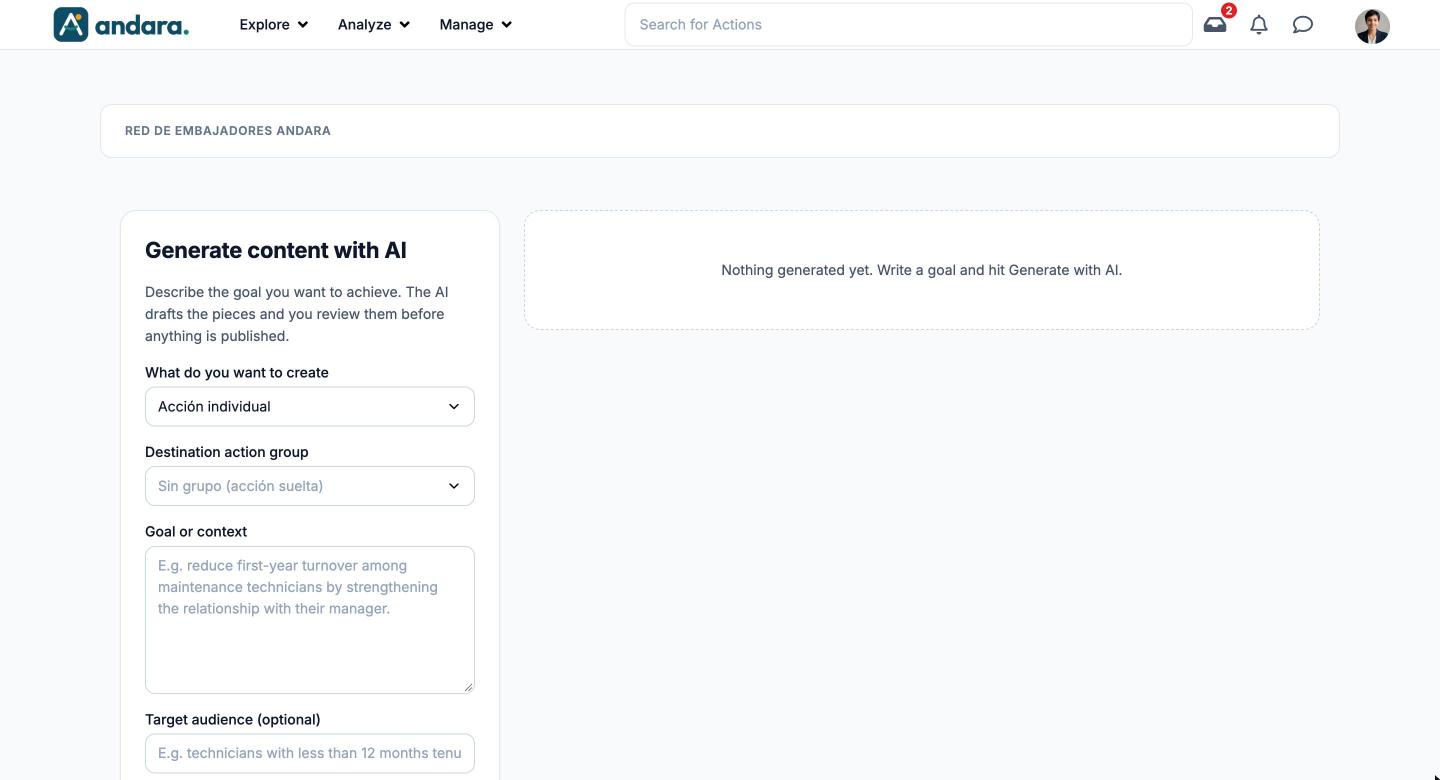
This is where you turn a goal written in your own words into draft content: one action, a journey of actions or an action group. The AI drafts the pieces and you review them before anything is published: generating creates nothing in the app.
It is planning. The AI suggests a type for each piece (cards, test, video…), but the content of each action is built afterwards, in Actions.
Where it is: Manage › Journeys › Actions Assistant.
What you see#
| Element | What it shows |
|---|---|
| Generate content with AI | The request form, on the left. |
| Proposals panel | On the right. When empty it reads Nothing generated yet. Write a goal and hit Generate with AI.; after generating, it shows the proposed pieces for review. |
| Generate with AI | Launches the proposal with what you filled in. |
Settings#
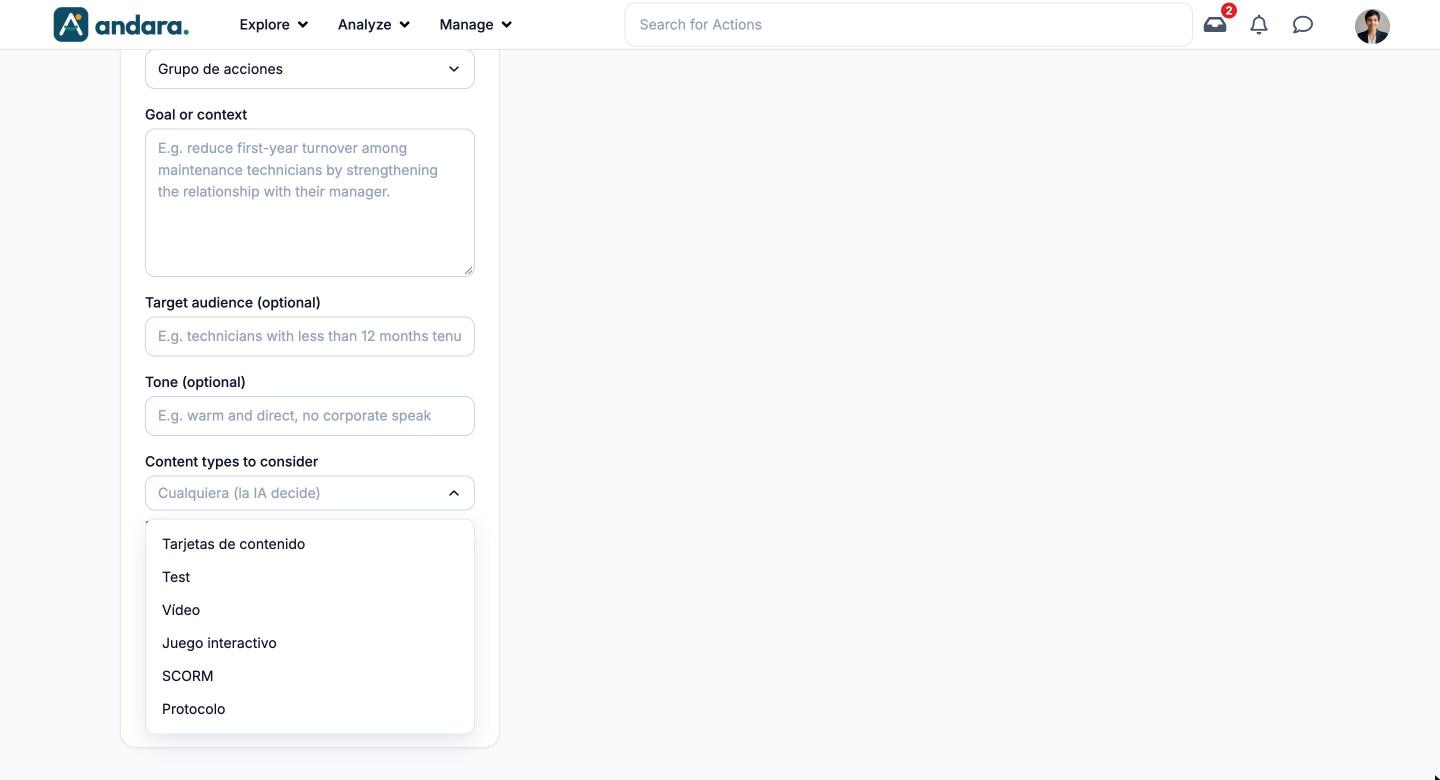
The form changes with the choice in What do you want to create: with a single action it asks for the destination group and not the number of pieces; with a journey or a group it is the other way round.
| Field | What it does | Values |
|---|---|---|
| What do you want to create | What the AI drafts: a single action, a full journey with its actions, or an action group. | Acción individual (single action), Itinerario de acciones (journey of actions) or Grupo de acciones (action group). The options are shown in Spanish. Default: single action. |
| Destination action group | Single action only. The group the action will belong to. | One of the project's groups, or Sin grupo (acción suelta) (no group, standalone action). Default: no group. |
| Goal or context | What you want to achieve. This is the field that changes the result most: the more concrete the behaviour you describe, the better the output. | Free text. Example shown: reduce first-year turnover among maintenance technicians by strengthening the relationship with their manager. |
| Target audience (optional) | Who it is for. It adjusts tone and examples. | Free text. |
| Tone (optional) | How you want it to sound. | Free text. Example: warm and direct, no corporate speak. |
| Content types to consider | Limits the types the AI may suggest for each piece. The help text makes it clear: the AI suggests one type per piece within your selection; the content itself is built later. | Tarjetas de contenido (content cards), Test, Vídeo, Juego interactivo (interactive game), SCORM, Protocolo (protocol). Default: Cualquiera (la IA decide) (any, the AI decides). |
| Number of pieces | Journey or group only. How many actions it drafts. | Number from 1 to 12. Default: 3. |
| Duration (weeks) | Over how many weeks the pieces are spread. | Number from 1 to 26. Default: 4. |
How to#
Ask for a proposal#
- 1
Choose what to create
In What do you want to create, pick an action, a journey or a group. For an action, choose its group.
- 2
Write the goal
Fill in Goal or context with the behaviour you want to see: what the person does, where and with whom.
- 3
Fine-tune
Add audience and tone if they help, tick the content types that fit and adjust pieces and weeks.
- 4
Generate
Click Generate with AI and wait for the proposal to appear on the right.
- 5
Review and publish
Go through each piece before publishing it. Reviewing and the two ways of publishing are covered in AI content assistant.
Things to know#
- Generating does not publish. Nothing reaches the app until you publish the proposal; what you publish is finished off in Actions.
- The suggested type is a plan, not the content. If a piece comes out as a test or a video, you still have to create the test or upload the video.
- The limits are in the form itself: at most 12 pieces and 26 weeks per request. For more, chain several requests.
- What you publish is your company's content: check names, figures and claims, because the AI does not fact-check.
Related#
- AI content assistant: reviewing and publishing proposals.
- Journeys and actions: where the output fits.
- Actions, Journeys and Action Groups.