What it is and what it's for#
Points are generated automatically: for completing actions, answering surveys, signing in each day, receiving recognition. But every now and then you have to step in: an action that was rejected by mistake, a reward that never arrived, a data load that duplicated entries.
There are two screens for that:
Points by user
A person's history of point movements, line by line, and where corrections are made.
Purchases
Under Manage › Rewards. Shop purchases from the moment they are placed until they are delivered.
Points earned and balance are not the same thing. Points earned are the accumulated history and feed the ranking; the balance is what is left after spending in the shop. See Basic concepts.
How to set it up#
Correct a person's points#
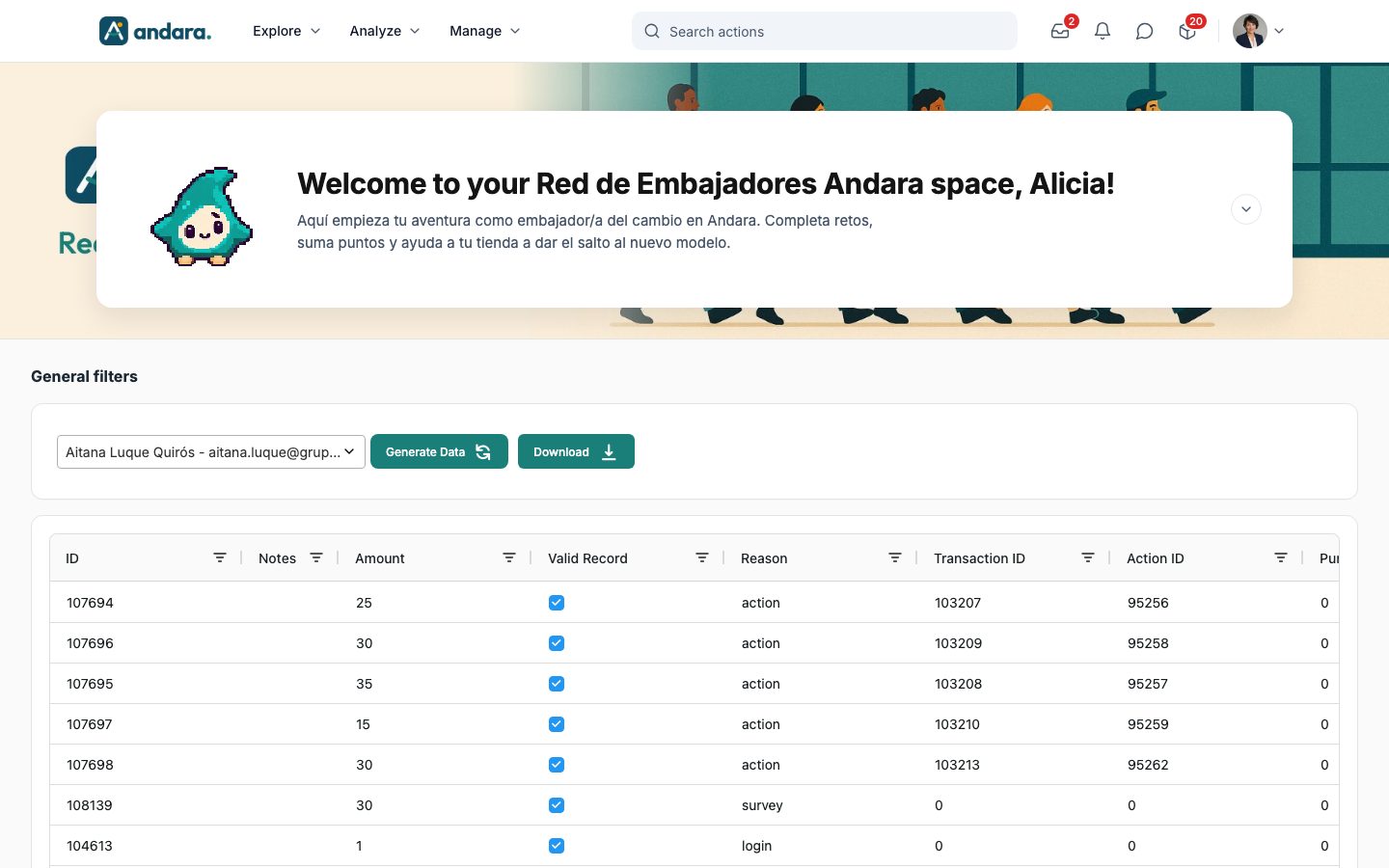
The points-by-user screen is not in the Manage menu: it opens at the /manage_points_by_user address of your app. You will work with Select user, Amount, Valid Record, Reason and Notes.
- 1
Choose the person
Under General filters, open Select user, type part of their name, pick them and press Generate Data. Until you press it, the table is empty.
- 2
Find the movement
Their full history appears. The Reason column shows where each line comes from (for example
action,survey,login,purchaseorpeer_feedback), and Action ID, Purchase ID and Survey ID tell you which action, purchase or survey. - 3
Correct the line
Three things can be edited: Amount, Valid Record (whether the movement counts) and Notes. Double-click the cell, type and press Enter: the change is saved immediately, with no save button.
- 4
Leave a record
Always write in Notes why you touched that line, with the date and reason. It is the only thing that will explain the change six months from now.
When points are wrong, correct the wrong line, do not offset it with a new movement. An offsetting entry leaves two contradictory lines in the history and makes the person's record unreadable.
If a movement should never have existed, untick Valid Record instead of setting the amount to zero: that way it is clear it was there and was cancelled.
The Download button exports that person's history to a file. Download it before touching anything: if you get in a muddle, you know exactly how it was.
When to adjust points by hand#
| Situation | What to do |
|---|---|
| An action was rejected by mistake | Correct that action's line with an explanatory note. |
| A data load duplicated movements | Untick Valid Record on the duplicated lines. |
| A reward is not going to be delivered | Set the order to Cancelled in Purchases: that refunds the points. Do not touch the redemption line. |
| Recognising something outside the programme | Better not. Create an action for it; that way it is the same for everyone. |
Every manual adjustment throws the analytics out: points appear with no action to explain them. Use it to correct mistakes, never as a shortcut for rewarding.
Day-to-day use#
Follow shop orders#
When someone redeems a reward, their balance is deducted at that moment, not on delivery. The purchase goes into Purchases and into the Orders to process icon in the top bar, and stays there until it is closed.
At the top, the screen tells you how many purchases there are, how many are to process, how many days the oldest one has been waiting and how many points have been spent. You can filter by Status, Item and Location, and tick several orders to change their status in one go.
Each row has quick actions (Ready for pickup, Mark as dispatched) and Edit, which opens the purchase form:
- Dispatch status: To process, Ready for pickup, Dispatched, Received, Cancelled and the cancellation statuses. Changing it notifies the person by email and in the app (unless you untick Notify the person of the status change). Ready for pickup and Dispatched send them the item's delivery instructions; Cancelled refunds their points.
- Cancellation requested: flags that the purchase must not be dispatched; the unit goes back into stock on its own when you save.
- Notes: internal. The person who bought it does not see them.
The same orders can be handled from the inbox: when you expand one, it offers to change the status without leaving the panel. The fields and steps are in Purchases.
Cancellation requested only puts the unit back into stock. What refunds the person's points is setting the Dispatch status to Cancelled. If you only do the first, they end up with no reward and no points.
Watch the budget#
Analyze › Points Follow-up › Points Detail Report holds the programme's financial picture, on a screen titled Economía de puntos (points economy). It loads for one project or for all your projects and gives each figure in points and in euros, using the conversion your company has set: Emitido (issued), Canjeado (redeemed), Saldo circulante (the outstanding balance still to be redeemed) and Pendiente de entrega (pending delivery). Below that, the programme's pace, where points come from and whether the shop is within people's reach. These are totals: there is no breakdown by person. What each figure measures is in Points Detail Report.
The Saldo circulante (outstanding balance) is a liability, not a surplus. These are points people already have and can spend any day: what it would cost if everyone redeemed today. If you only look at Canjeado (redeemed), you underestimate the real cost of the programme.
Frequently asked questions#
If I correct points, does the ranking change?
Yes. The ranking adds up point movements that are not purchases, so correcting a line moves that person's position. Spending balance in the shop never lowers the ranking.
Can I give points to a whole group at once?
Not from this screen, which works person by person. To give points to a group, create an action targeted at that group: it is quicker, it is explained and it shows up in the analytics.
Can someone's balance go negative?
You can type any amount, including one that takes the balance below zero. Avoid it: the app shows that number as it is and the person does not understand what has happened. Untick Valid Record on the extra movement instead.
Someone says they are missing points. Where do I start?
Open their history in points by user and look for the line of the challenge they are claiming. Either the line does not exist (the action was never approved) or Valid Record is unticked (someone cancelled it and there should be a note). It is almost always the first: check whether the submission is still in the inbox or was rejected.
What happens to the points of someone who leaves the company?
They stay in their history. If they had redemptions in progress, decide whether they are delivered or cancelled before deactivating them.
Does the employee see the notes I write on a movement?
No. Notes are for the team running the programme.
Limits and caveats#
- Changes in points by user are saved instantly and there is no undo. Download the history before touching a record with many movements.
- Correct the wrong line; do not offset it with a new entry. It keeps histories readable.
- A manual points adjustment does not notify the person. If the change affects them, tell them yourself. Order status changes do notify them, unless you untick it.
- The balance is deducted on redemption, not on delivery. An order stuck for weeks is balance already spent with nothing in return: the days-waiting column and the Orders to process icon remind you.
- Manual adjustments do not reconcile with action analytics. If you make many, the dashboards stop explaining where the points come from.