What it is for#
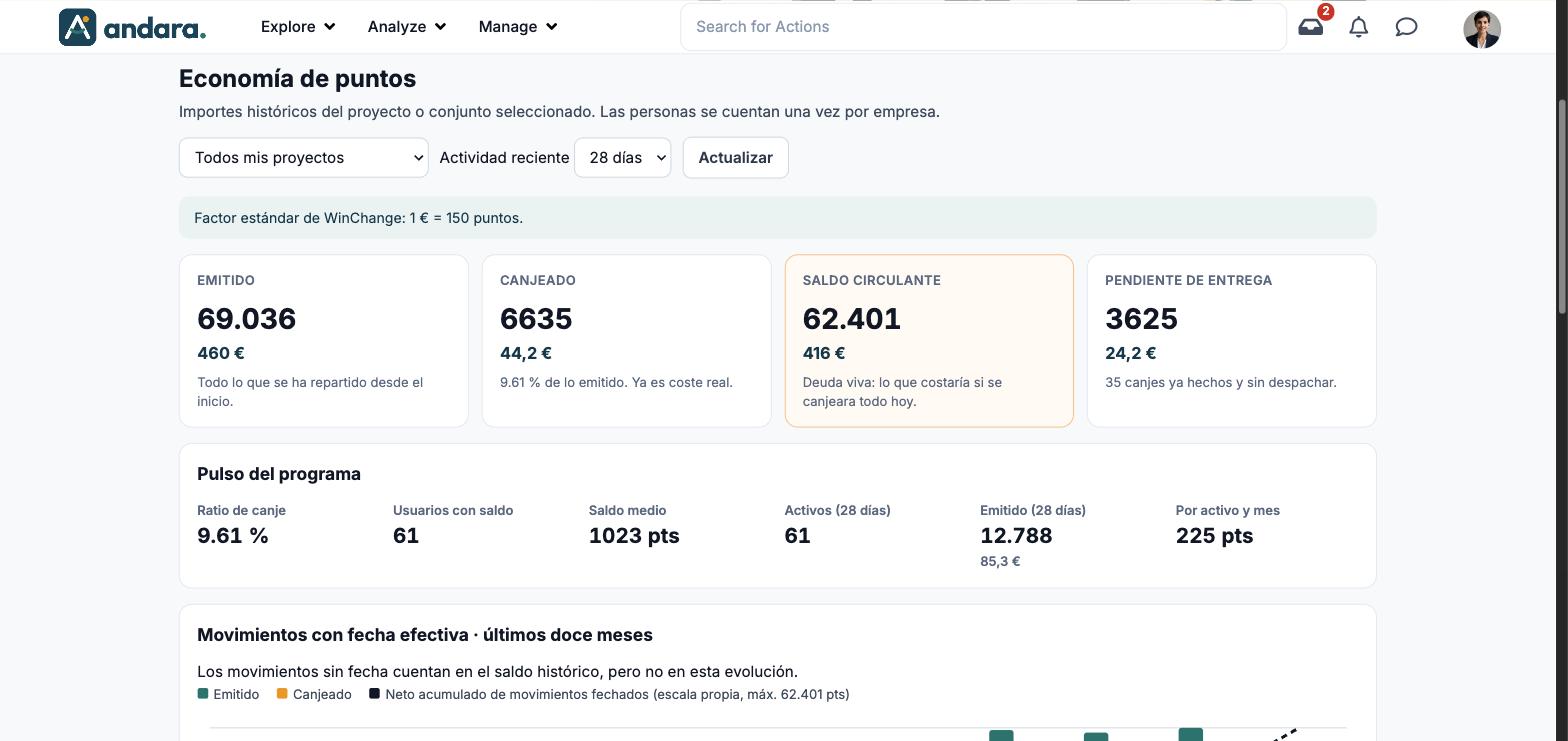
This screen answers what the programme costs: the points handed out, the ones already exchanged for rewards and the ones people still have in their pocket, each with its equivalent in euros. The screen is titled Economía de puntos (points economy).
Use it to keep an eye on the outstanding liability (what it would cost if everyone redeemed today), check whether the store is within people's reach and compare projects.
This screen is only in Spanish, also when the app is in English. The labels below are written as they appear, with their meaning.
Where it is: Analyze › Points Follow-up › Points Detail Report.
What you see#
| Element | What it shows |
|---|---|
| Subtitle | "Importes históricos del proyecto o conjunto seleccionado. Las personas se cuentan una vez por empresa." (all-time amounts for the selected project or set; people are counted once per company). |
| Project selector | Todos mis proyectos (all my projects) or a single project. |
| Actividad reciente | The window for recent figures (recent activity): 7 días, 28 días or 90 días. |
| Actualizar | Refresh: requests the data again with your selection. |
| Conversion factor | "Factor estándar de WinChange: 1 € = 150 puntos." It is the rate used to turn points into euros. |
| Cards | Emitido, Canjeado, Saldo circulante and Pendiente de entrega, in points and in euros (see Metrics). |
| Pulso del programa | Six pace figures (programme pulse): Ratio de canje, Usuarios con saldo, Saldo medio, Activos (28 días), Emitido (28 días) and Por activo y mes. |
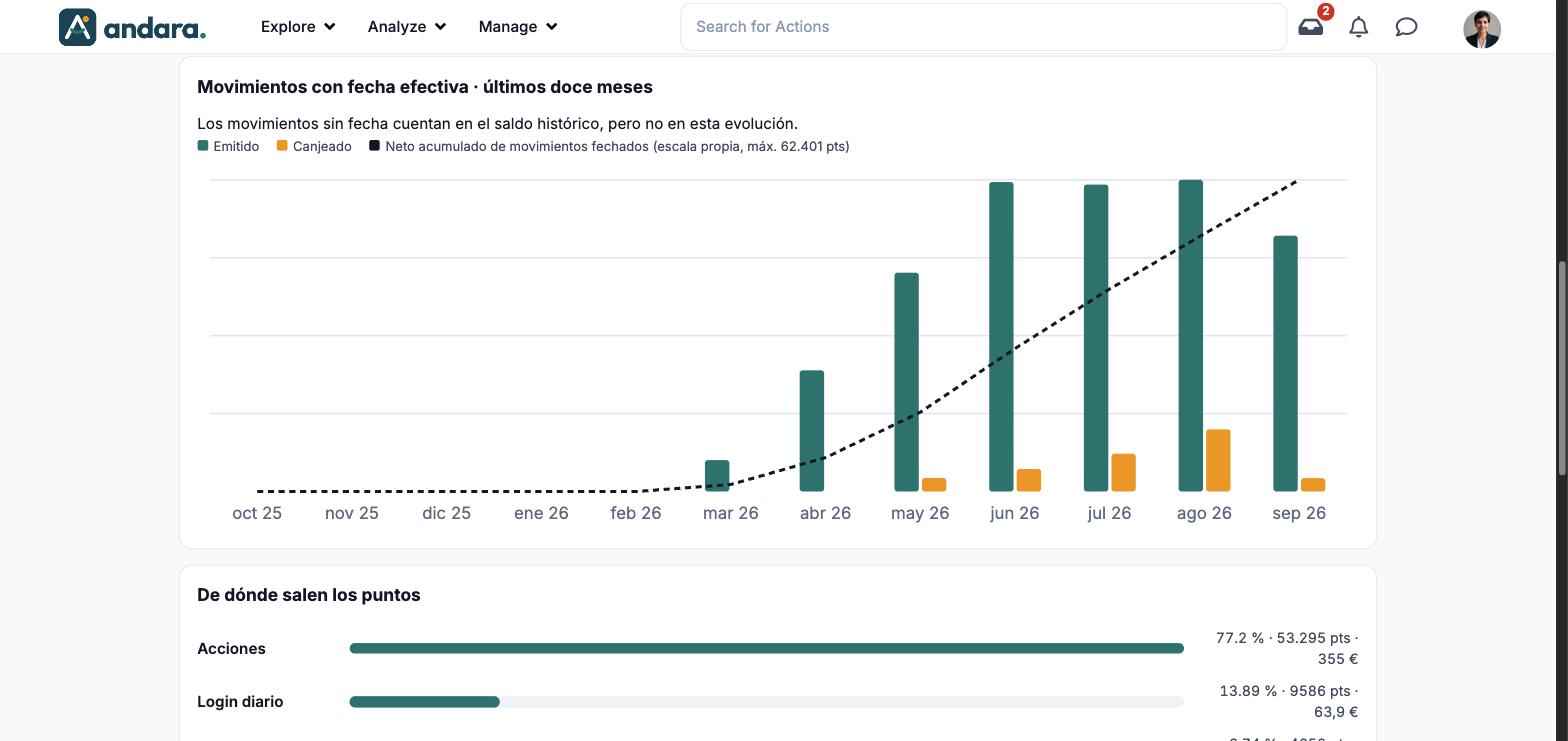
| Movimientos con fecha efectiva · últimos doce meses | Month-by-month bar chart of dated movements over the last twelve months. |
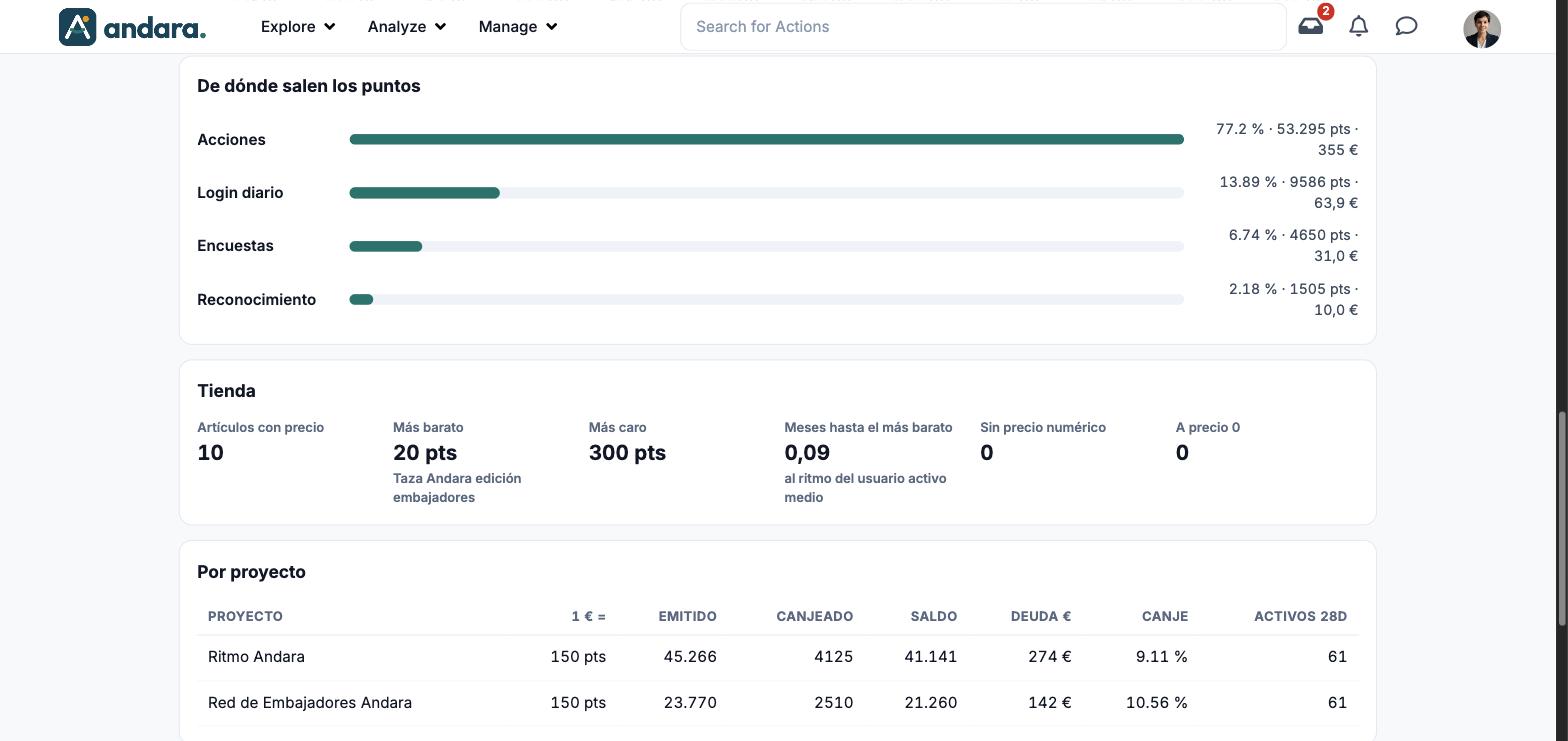
| De dónde salen los puntos | Bars by points source (where the points come from). |
| Tienda | Six figures about store prices. |
| Por proyecto | Table with one row per project. |
Metrics#
| Metric | What it measures | How it is calculated |
|---|---|---|
| Emitido (issued) | Everything handed out since the start. | Total points given, and their value in euros at the conversion factor. |
| Canjeado (redeemed) | What has already been exchanged for rewards. "Ya es coste real": it is already a real cost. | Total points redeemed and their value in euros. Underneath, the percentage of what was issued. |
| Saldo circulante (outstanding balance) | The live liability: what it would cost if everything were redeemed today. | Issued minus redeemed, in points and in euros. |
| Pendiente de entrega (awaiting delivery) | Redemptions already made that have not been shipped. | Points and euros of those redemptions, and how many there are. |
| Ratio de canje (redemption rate) | What share of the issued points has been redeemed. | Redeemed over issued, as a percentage. |
| Usuarios con saldo (users with a balance) | How many people have unspent points. | People with a balance, counted once per company. |
| Saldo medio (average balance) | How many points people with a balance hold on average. | In points. |
| Activos (28 días) (active) | People with activity in the chosen window. | Changes with Actividad reciente. |
| Emitido (28 días) | Points handed out in that window. | In points and in euros. |
| Por activo y mes (per active user per month) | The pace at which an active person earns points. | Points per active person per month. |
| Movimientos con fecha efectiva | The trend over the last twelve months. | Emitido and Canjeado bars per month and a line for the Neto acumulado de movimientos fechados (cumulative net of dated movements), on its own scale. Movements with no date count in the all-time balance but not in this trend. |
| De dónde salen los puntos | What share of the issued points comes from each source: Acciones (actions), Login diario (daily login), Encuestas (surveys) and Reconocimiento (recognition). | Percentage, points and euros per source. |
| Artículos con precio | How many store rewards have a points price. | Number of items. |
| Más barato / Más caro | The price of the cheapest reward (with its name) and of the most expensive one. | In points. |
| Meses hasta el más barato | How long a person takes to afford the cheapest reward. | At the pace of the average active user, as the card says. |
| Sin precio numérico / A precio 0 | Badly priced items: without a number as price, or free. | Number of items. They should normally be 0. |
| Por proyecto | The same figures split by project: Proyecto, 1 € =, Emitido, Canjeado, Saldo, Deuda € (liability), Canje (redemption rate) and Activos 28D. | One row per project, with each one's conversion factor. |
Filters#
| Filter | What it does | Values |
|---|---|---|
| Project selector | Picks which project the figures are for, or adds up all yours. | Todos mis proyectos and the list of projects. Default: Todos mis proyectos. |
| Actividad reciente | The window for recent figures (active people, issued in the period). The cards at the top are all-time and do not change. | 7 días, 28 días, 90 días. Default: 28 días. |
How to#
See what the programme owes in one project#
- 1
Pick the project
In the selector, change Todos mis proyectos to the project you want.
- 2
Load
Click Actualizar and wait for the cards to fill in.
- 3
Read the balance
Saldo circulante is what it would cost if everyone redeemed today; Pendiente de entrega is what has been redeemed and is still to be shipped.
Check whether the store is within reach#
- 1
Go down to Tienda
Look at Meses hasta el más barato: if it is high, people cannot reach any reward in a reasonable time.
- 2
Review odd prices
If Sin precio numérico or A precio 0 are not 0, review those items in Store Items.
Things to know#
- The euros are an equivalence: they come from dividing points by the conversion factor (1 € = 150 points), not from what each reward really cost.
- People are counted once per company. With Todos mis proyectos, someone in two projects counts once in Usuarios con saldo; in Por proyecto, they count in each.
- The top cards are all-time. Actividad reciente only moves the figures for the period.
- Movements with no date count in the balance but do not show in the monthly chart.
- There is no per-person breakdown: the screen only gives totals, for one project or all your projects.
Related#
- Points, badges and streaks and Point adjustments and redemptions.
- Store Items and Purchases.
- Company settings: points for signing in.